How the HE Engine works
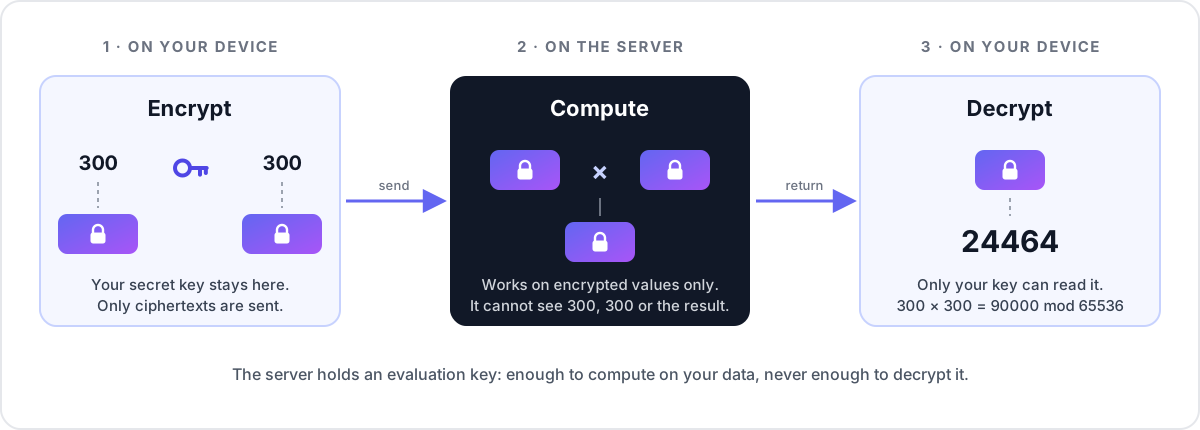
The Homomorphic Encryption Engine (HE Engine) is a server that you or your
organisation run. Its users send it encrypted numbers, it computes on them without
decrypting them, and only the users can read the results. This page explains what
happens to the data, which keys exist and where they live, and what the server can
and cannot learn. For a hands-on walkthrough see the user guide;
for the exact cryptographic parameters see parameters.md.
Why run it as a server
Homomorphic encryption matters when the machine that computes is not fully trusted by the people whose data it is: a server shared by a team, an internal service run by an IT department, or your own instance on a rented cloud machine. The users keep their secret keys; whoever runs the server (the operator) only ever sees ciphertexts.
The steps
- Generate a key pair on your device. The secret (client) key stays there.
- Register the evaluation key with the server, once, and its public key. The server can compute with them but cannot decrypt.
- Encrypt your inputs (optionally with a proof that they are well formed) and submit a job naming the operation and the type.
- A worker on the server evaluates the operation on the ciphertexts with your evaluation key and stores an encrypted result.
- Fetch the encrypted result and decrypt it on your device.
The keys
- Client key (~48 KB): generated on your device, used to encrypt and decrypt. It is never uploaded. In the dashboard it stays in the browser's IndexedDB, encrypted with your passphrase (see Your key in the browser).
- Compressed server key (~60 MB): an evaluation key derived from the client key.
It lets the server compute on your ciphertexts but not decrypt them. You register
it once with
POST /api/v1/keys; the server checks it against its parameters. - Compact public key (~33 KB): lets anyone encrypt for you, and the server check
proofs of inputs. It cannot decrypt. You upload it with
PUT /api/v1/keys/{id}/public-key. Each one generated is different, so proofs must be made with the one you uploaded; the dashboard and the CLI keep it. - Ciphertexts: from ~17 KB (a boolean) and ~66 KB (8 bits) to ~530 KB (64 bits). A proven list holding several inputs is ~20 KB.
Keys made before HE Engine 0.5 lack the public-key parameters. They keep working for everything except proven inputs.
What you can compute
| Types | u8, u16, u32, u64 and i8, i16, i32, i64 (two's complement) |
| Arithmetic | add, subtract, multiply (wrapping modulo 2^bits), min, max |
| Comparisons | eq, ne, lt, le, gt, ge: the result is an encrypted boolean |
| Sums | sum of 2 to 16 encrypted inputs |
| Plain operands | any operation but sum can take its right-hand side as a plain number (a scalar): faster, but the server sees that number |
| Programs | several operations in one job, written as an expression such as (a + b) * 3 < c ? a : b, with lookup tables and several results: see below |
| Batches | up to 16 jobs in one request, queued together or not at all |
| Compressed results | keys made with the SDK's --compression get every result of a job back as one list of about 2 KB, instead of 130–530 KB per value |
Programs
A program runs up to 64 steps on up to 16 encrypted inputs in one job; every
intermediate value stays encrypted on the server, and only its results come back:
the last step's, or up to 16 the program names (a + b, a < b has two). The
dashboard and the CLI take an expression and compile it into steps; the API takes
the steps (see Using the API).
| In expressions | |
|---|---|
| Inputs | the letters a to p, in the order the values are given |
| Arithmetic | + - * / % (wrapping; / and % truncate toward zero), unary - |
| Bitwise | & | ^ and ! (or ~) on integers; << >> by a constant number of bits (>> keeps the sign of signed types); rotl(x, n), rotr(x, n) |
| Comparisons | == != < <= > >=, giving a boolean; && || (and & | ^ !) combine booleans |
| Choice | c ? x : y, an encrypted if-then-else: the server computes both branches and cannot tell which one was taken |
| Functions | min(x, y), max(x, y), abs(x) (signed types) |
| Lookup tables | lookup(x, [1, 4, 9, 16]) gives the entry at position x (from 0), lookup(x, [-1: 10, 5: 50], 0) the value for key x; keys not in the table give the default (the third argument, 0 if absent). Up to 256 entries: a whole u8 table fits. The server learns the table but not which entry was used |
| Several results | expressions separated by commas, e.g. min(a, b), max(a, b) |
| Constants | whole numbers in the type's range; they are sent unencrypted, so the server sees them |
Division by an encrypted zero does not fail (the server cannot tell it is zero): it
gives the type's maximum for unsigned types, and −1 (or 1 for a negative dividend)
for signed ones, with the dividend as the remainder; MIN / −1 wraps to MIN. These
are TFHE-rs's results, and the dashboard's expected value follows them. Division by
the constant 0 is refused. Every step costs about as much as a single job of that
operation, so a long program on 64-bit values can take minutes. A lookup costs
about one equality test per entry (TFHE-rs's match_value_or; signed values are
looked up by their bits), so large tables on wide types are slow.
Compressed results
A result is one ciphertext of 130 KB (u16) to 530 KB (u64). Keys made with
heaas keygen --compression (or fhe::generate_compressing_keys) also hold
TFHE-rs's compression keys (COMP_PARAM_MESSAGE_2_CARRY_2_KS_PBS_TUNIFORM_2M128).
A job sent with compress_results then returns all its results packed into one
CompressedCiphertextList, measured at about 1.9 KB for one u16 or u64 and
2.0 KB for four u16s. The costs:
- the compressed server key is about 106 MB instead of 60 MB;
- unpacking the list needs the server key on the client, which decompresses it
(about a second and ~180 MB of memory);
- TFHE-rs 1.8.2's browser build can neither make such keys nor unpack such lists,
so this is for the SDK and CLI only.
General-purpose compression does not help: gzip saves 0.5% of a ciphertext.
Proven inputs
Normally the server can only check that a ciphertext has the right shape. With proven inputs, the client encrypts the values under the key's public key into one list and attaches a zero-knowledge proof (TFHE-rs's compact public-key encryption proofs) that the list is a well-formed encryption of values of the declared type. The server verifies the proof before computing and refuses the job if it does not verify.
- The proof is bound to the key's id, so a proof made for one key is refused for another.
- It is checked against a CRS (common reference string) that the server generates on
first start and publishes at
GET /api/v1/he/crs; its hash is in/he/params. Whoever generates a CRS is trusted not to have kept a trapdoor: here that is the server's operator. See Zama's documentation on zero-knowledge proofs. - Proving takes about a second on the client; verifying, a fraction of a second up to about a second on the server.
- A proof shows that inputs are well formed; it says nothing about whether the server then computes correctly (see the limits below). Today only a key's owner can submit jobs for it, so proofs mainly guard against corrupted or crafted inputs.
Architecture
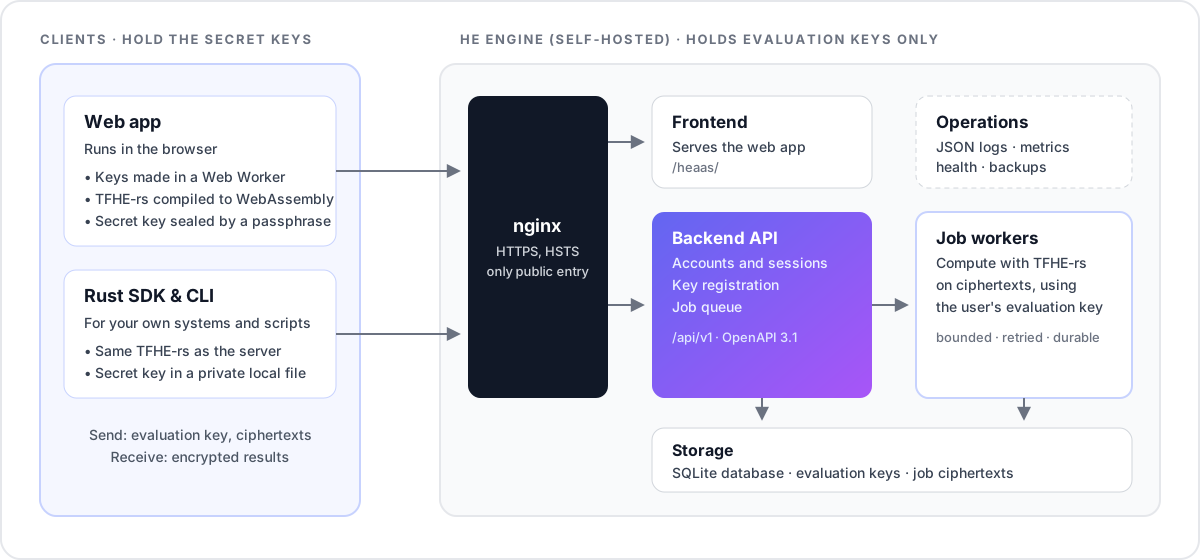
heaas-core holds what the backend, the SDK and the CLI must agree on: the TFHE
parameters, the operations and the API types.
Parameters
| Scheme | TFHE (CGGI), TFHE-rs 1.8.2 (pinned; clients must use the same release) |
| Configuration | ConfigBuilder::default(): TFHE-rs default parameters (PARAM_MESSAGE_2_CARRY_2_KS_PBS_TUNIFORM_2M128, failure probability ≤ 2⁻¹²⁸), plus Zama's dedicated compact-public-key parameters (PARAM_PKE_MESSAGE_2_CARRY_2_KS_PBS_TUNIFORM_2M128) |
| Types | FheUint8–FheUint64, FheInt8–FheInt64, FheBool for comparison results |
| Operations | see What you can compute |
| Live values | GET /api/v1/he/params |
| Full parameter sheet | parameters.md, generated from core/src/params.rs |
Uploaded keys, public keys, ciphertexts and proven lists are deserialized with
TFHE-rs's size-limited, conformance-checked safe_deserialize_conformant, so keys
made with other parameters and malformed or foreign ciphertexts are rejected, not
computed on. Results are conformant too: where TFHE-rs would leave part of a result
unencrypted because a plain operand makes it known (x × 0, say), the server
re-encrypts it.
What the server can and cannot learn
The server cannot decrypt inputs or results: it only ever holds evaluation keys.
It does see metadata: your account, when you submit jobs, which operation and type each job uses, how many inputs it has, ciphertext sizes and how many jobs you run. It also sees every plain operand (scalar) you choose to send unencrypted.
Know these limits too:
- Results are not verifiable. A dishonest or compromised server could return a wrong ciphertext. TFHE alone does not prove that a computation was done correctly.
- The dashboard trusts its own JavaScript. The browser code that generates and
stores your key is served by the operator. If you don't want to trust that code,
use your own client, such as the Rust SDK and
heaasCLI. - Your passphrase cannot be recovered. Nobody, including the operator, can reset it. Without it (or without a backup file after clearing site data) the key and everything encrypted under it is lost.
Your key in the browser
- Generated and used in a Web Worker. Key generation, encryption and decryption run in the TFHE worker; the page itself never holds the plaintext client key.
- Stored sealed. The worker encrypts the client key with AES-256-GCM under a key derived from your passphrase with PBKDF2-HMAC-SHA256 (600,000 iterations, the OWASP recommendation; WebCrypto offers no memory-hard KDF). The SHA-256 of the matching evaluation key is authenticated alongside, so a sealed key only opens for its own server key.
- Unlocked per tab. After a reload, the key must be unlocked with the passphrase again. Signing out stops the worker and forgets the unlocked key.
- Backups. Export backup on the Keys page downloads the sealed key as a JSON
file (
heaas-key-….json); it is useless without the passphrase. Import backup restores it in another browser after checking the passphrase and that the file matches one of your registered evaluation keys. - Keys stored by earlier versions without a passphrase are sealed the first time they are unlocked.
Accounts and sessions
- Sessions. Signing in returns a 15-minute access token and sets a refresh token
as an
HttpOnly; Secure; SameSite=Strictcookie scoped to/api/v1/auth. The dashboard keeps the access token in memory only, so page scripts can never read a long-lived credential. Every refresh rotates the cookie; replaying an old one (more than 10 seconds after it was rotated) revokes that whole session. - Cross-site requests. Cookie-authenticated endpoints also refuse requests whose
Originis not the app's own (APP_BASE_URLorALLOWED_ORIGINS). - Email links (verification, password reset) open frontend pages that carry the token in the URL fragment and submit it with a POST. Opening a link (or a mail scanner prefetching it) changes nothing. Links work once; verification links expire after 24 hours and reset links after 1 hour. Tokens are stored hashed.
- Google and GitHub sign-in use the authorization-code flow with PKCE and a
signed state cookie. Only provider-verified email addresses are accepted (GitHub:
the verified primary address). The callback hands the browser a one-time code,
never a token, which the page exchanges with
POST /api/v1/auth/exchange. - Rate limits are keyed on the client IP (the rightmost
X-Forwarded-Forhop not added by aTRUSTED_PROXIESaddress, so clients cannot choose their own) and on the target email address for sign-in attempts and outgoing email; signed-in requests are also limited per account. - Sensitive changes. Changing or resetting the password signs out every session. Deleting an account needs its password, or, for Google/GitHub-only accounts, a sign-in within the last 5 minutes.