⚡ Performance
LiSa-LLM runs on llama.cpp's engine, so a single request goes exactly as fast as it would in llama.cpp itself. Where it pulls ahead is when several clients talk to it at once, and the sandbox doesn't cost anything you can measure.
Benchmarks
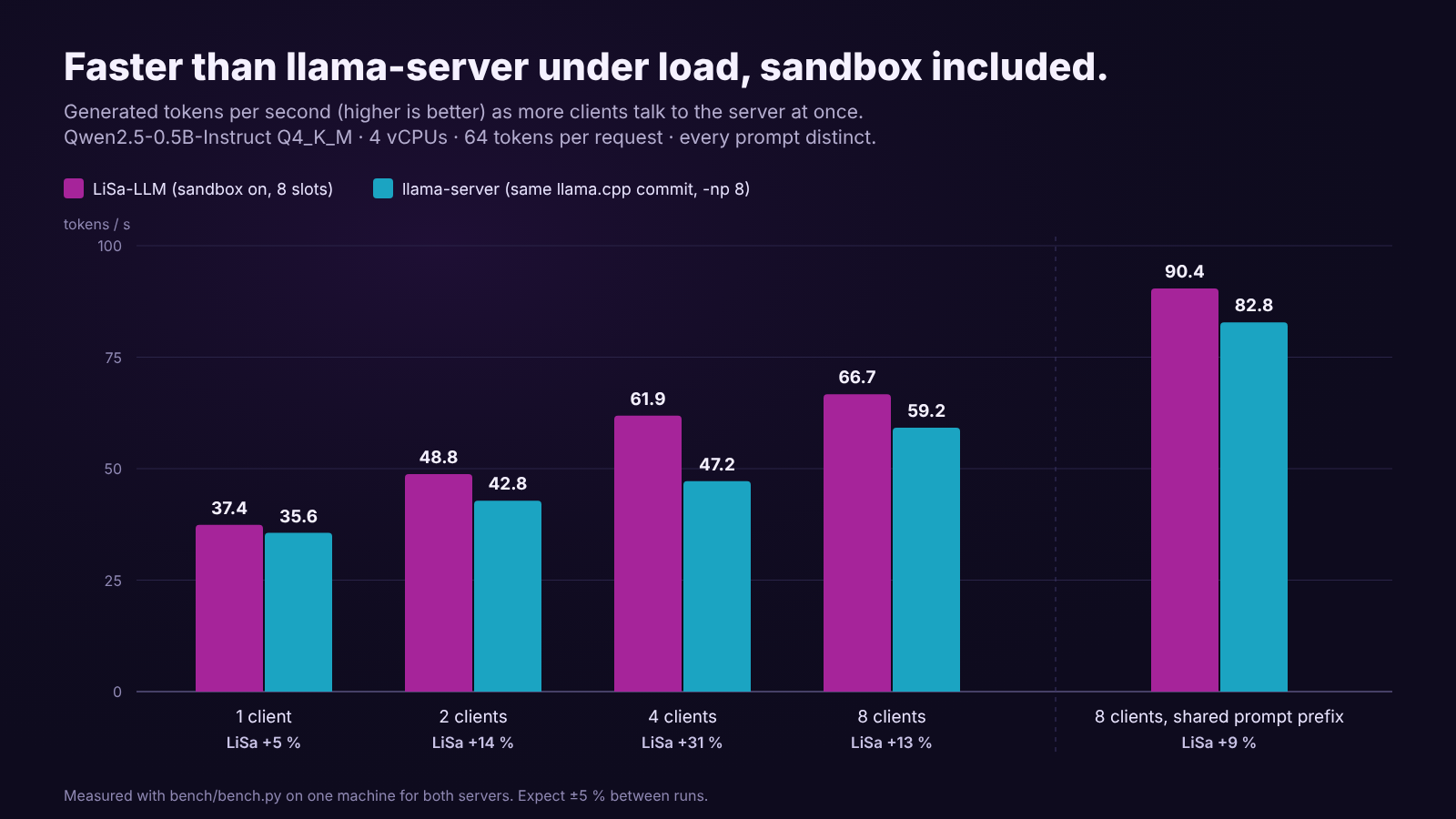
Measured with bench/bench.py on the same machine and model for both servers:
Qwen2.5-0.5B-Instruct Q4_K_M, 4 vCPUs (Xeon @ 2.8 GHz, AVX2), 4 threads, 64 tokens per request,
8 requests per level, every prompt distinct. LiSa runs with the sandbox on and 8 slots;
llama-server is built from the same llama.cpp commit and runs with -np 8.
| Concurrency | LiSa tok/s | llama-server tok/s | LiSa TTFT p95 | llama-server TTFT p95 |
|---|---|---|---|---|
| 1 | 37.4 | 35.6 | 0.31 s | 0.36 s |
| 2 | 48.8 | 42.8 | 0.77 s | 0.77 s |
| 4 | 61.9 | 47.2 | 1.07 s | 1.41 s |
| 8 | 66.7 | 59.2 | 2.38 s | 2.56 s |
TTFT is the time to the first token, the wait a user feels before text starts to appear.
With a long prompt shared by every request (--shared-prefix, like a system prompt), the prompt
cache copies that prefix between slots: 90.4 tok/s and 0.20 s TTFT p95 at concurrency 8
(llama-server: 82.8 tok/s, 0.12 s). Before continuous batching arrived, LiSa stayed at about
37 tok/s whatever the concurrency. Expect ±5 % between runs.
Run it against your own hardware and model, or against any other OpenAI-compatible server:
python3 bench/bench.py --url http://127.0.0.1:8080 --key "$KEY" --concurrency 1,2,4,8
python3 bench/bench.py --url http://127.0.0.1:8080 --key "$KEY" --concurrency 8 --shared-prefix
bench.py needs only the Python standard library; --json prints machine-readable results.
How it gets there
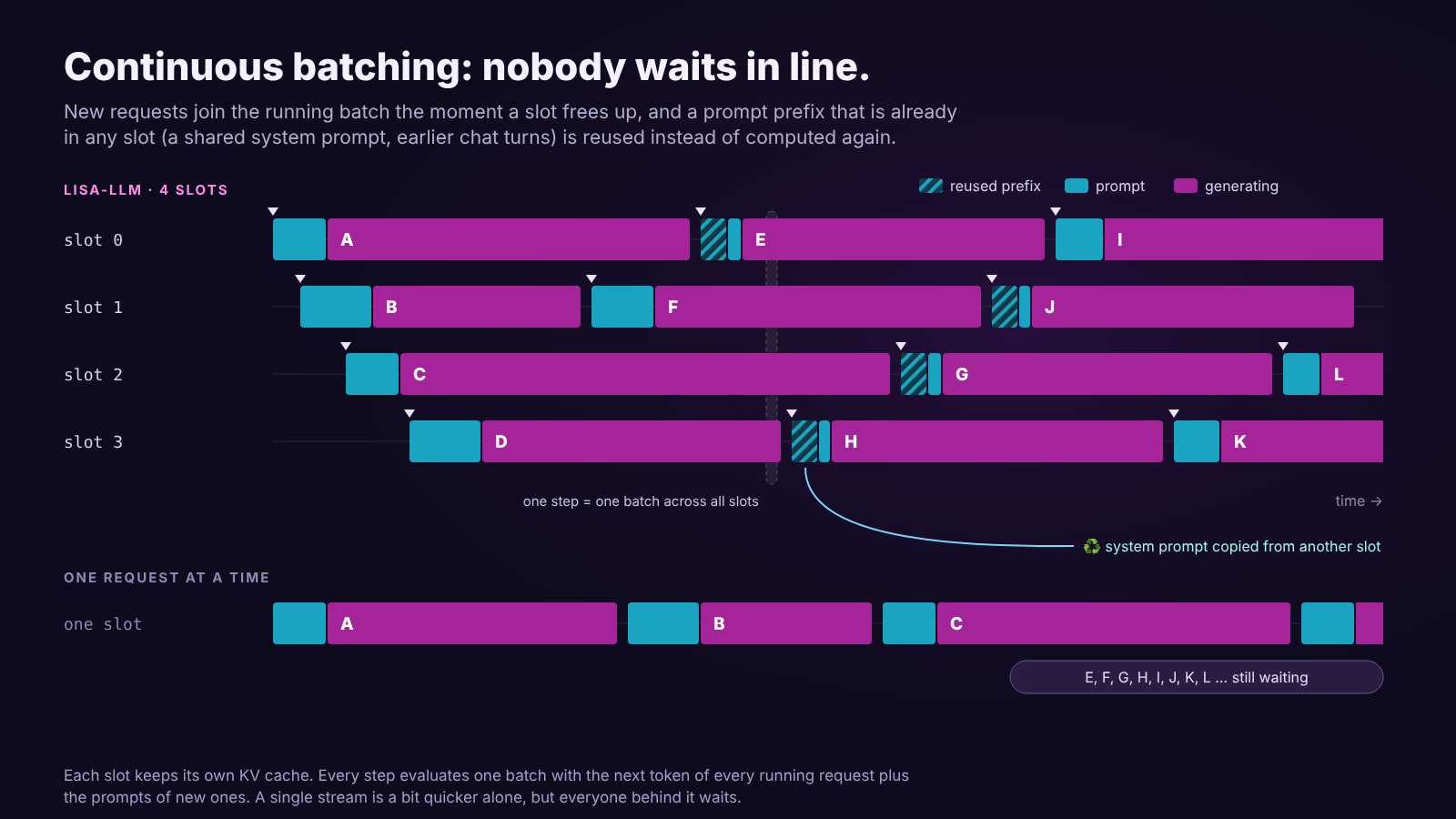
Continuous batching. The server has parallel_slots slots, each with its own slice of the
KV cache (the model's memory of the conversation so far). Every step evaluates one batch that
holds the next token of every running request plus the prompts of newly arrived ones. A new
request doesn't wait for a long answer to finish; it starts at the next step. One batch for
everyone uses the CPU (or GPU) far better than one request at a time.
Prompt cache. When a request arrives, LiSa looks for the longest prefix of its prompt that is
already in a slot's KV cache, keeps it and only evaluates the rest. If another slot holds a much
longer match (a shared system prompt, the earlier turns of the same chat), the prefix is copied
over instead of computed again. usage.prompt_tokens_details.cached_tokens and the
lisa_prompt_cached_tokens_total metric show how much was saved.
No sandbox tax. The worker generates; the broker only forwards text. Messages between them are
small and multiplexed over one socket. A single request, sandboxed, runs as fast as llama-server
does in-process.
Tuning
| Setting | Raise it when… | Watch out for |
|---|---|---|
parallel_slots |
Requests queue up (lisa_requests_queued > 0, 429s) |
Each slot reserves KV cache for max_context tokens |
max_context |
Prompts or chats get cut off (context_length_exceeded) |
Same: memory per slot |
kv_cache_type: q8_0 |
You need more slots or context in the same memory | Halves KV memory; needs flash attention; tiny quality cost (q4_0 saves more, costs more) |
flash_attention: on |
You use a quantised KV cache, or on GPUs | auto already enables it where supported |
n_threads |
Leave at 0 (one per CPU it may use) |
More threads than cores is slower, not faster |
gpu_layers |
CUDA builds: -1 offloads everything |
Lower it if the model doesn't fit in VRAM; GPU mode runs without the sandbox |
Rules of thumb:
- Many short chats (a support bot): more slots, modest
max_context(2048–4096). - Few long documents (summarising, RAG with big contexts): fewer slots, bigger
max_context. - Same system prompt for everyone: keep it identical and at the very start of every request, so the prompt cache can reuse it.
- Small model, many cores: throughput grows with concurrency up to about the core count; past that, add instances instead of slots.
Memory
Total memory ≈ model file size + KV cache + a few hundred MB of buffers, where
KV cache = parallel_slots × max_context × (KV bytes per token)
KV bytes per token depend on the model (layers × KV heads × head size × 2 × bytes per value). Some
examples at f16:
| Model | Per token | 4 slots × 4096 tokens |
|---|---|---|
| Qwen2.5-0.5B | ≈ 12 KiB | ≈ 192 MiB |
| Llama-3.2-3B | ≈ 112 KiB | ≈ 1.75 GiB |
| Llama-2-7B | ≈ 512 KiB | ≈ 8 GiB |
q8_0 halves the KV column, q4_0 quarters it. The log line "Model loaded" shows the context
size each slot actually gets (n_ctx: max_context, capped at the model's training context).
With the sandbox on, all of this lives in the worker, so memory_limit_bytes (default 4 GiB)
must cover it. If the worker dies right after loading and the log mentions an allocation failure,
raise it.