🔒 Security and the sandbox
LiSa-LLM's whole reason to exist is to run models you didn't build, on a network you don't fully control, without betting your machine on either. This page explains how, in plain language. The precise version, with every rule and its limits, is the threat model.
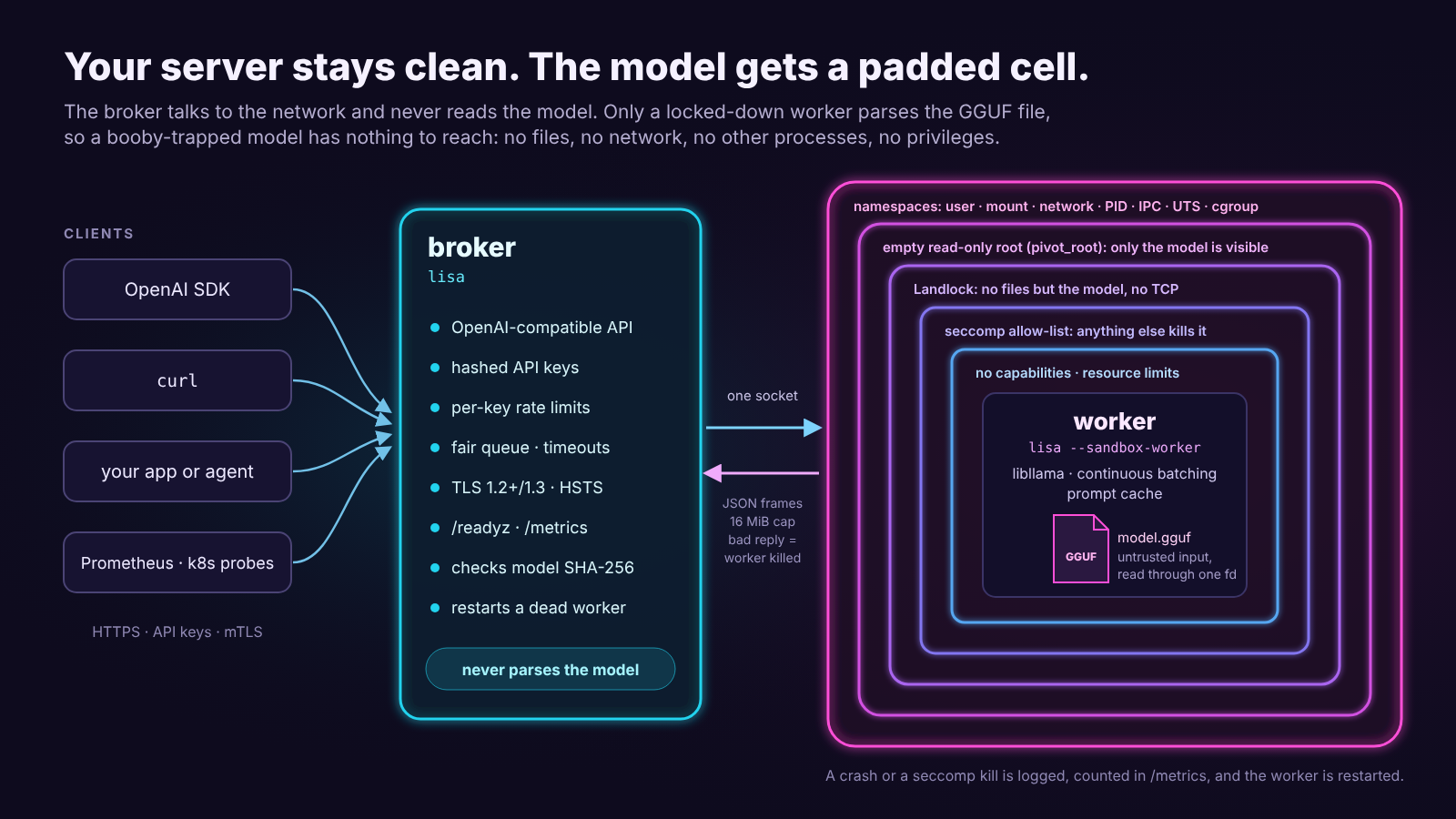
Why sandbox a model at all?
A GGUF file isn't just numbers. It's a binary format with headers, metadata, tensor tables and offsets, and the code that reads it is complicated C and C++. A crafted file that exploits a bug in that code could run its own code in whatever process opened it. Model files get passed around, re-uploaded and re-quantised by strangers all the time.
So LiSa splits the work in two:
- The broker (
lisa) handles the network: TLS, API keys, rate limits, the queue, the OpenAI API, metrics. It never parses the model. It only opens the file, checks its SHA-256 if you asked for that, and passes it on as an open file descriptor. - The worker (
lisa --sandbox-worker) is the only process that reads the model and runs llama.cpp. Before it touches the file it locks itself down, and it can't undo any of it:
| Layer | What it takes away |
|---|---|
| Namespaces (user, mount, network, PID, IPC, UTS, cgroup) | Its own empty world: no network interfaces, no other processes, no host hostname |
Empty read-only root (pivot_root) |
No host files at all; the model arrives as an already-open descriptor |
No capabilities, no_new_privs |
No privileges, now or ever (setuid binaries don't help it) |
| Landlock | A second wall around the file system, plus no TCP and no signals to the outside (on kernels that support it) |
| seccomp allow-list | Only the system calls inference needs; anything else kills the worker on the spot |
| Resource limits | Capped memory, open files, no core dumps; with sandbox_cgroup, hard memory and process limits |
And the broker doesn't trust the worker either: every message from it is size-checked and validated, and anything unexpected gets the worker killed and restarted instead of passed along. That decoder is fuzzed, and a deliberately hostile worker is part of the test suite.
What a successful model exploit gets: a process that can compute and answer through one socket. No files to read or encrypt, nobody to talk to, nothing to install, no way to stay.
What the sandbox needs
- Linux with unprivileged user namespaces (on by default on most distributions).
- Ubuntu 23.10 and newer restrict them through AppArmor. Allow them with
sudo sysctl kernel.apparmor_restrict_unprivileged_userns=0(add it to/etc/sysctl.d/to keep it after reboots), or write an AppArmor profile forlisa. - seccomp (every mainstream kernel).
- Landlock (kernel 5.13+) is used when available and skipped on older kernels; the log line
"Sandboxed worker ready"shows the Landlock version it got (landlock_abi). - In Docker:
--security-opt seccomp=unconfined --security-opt apparmor=unconfinedplusLISA_SANDBOX_ENABLED=true; see Deployment.
If the sandbox can't be set up, LiSa refuses to start rather than run the model unprotected, and the error says what's blocked and how to allow it.
When the sandbox is off
sandbox_enabled: false loads the model inside the broker. It logs a warning, and you should only
do it for models you trust. GPU offload always needs it (drivers need device files and ioctl
calls the sandbox can't allow), and so do the default container settings. In those cases:
- pin the model with
model_sha256, so a swapped file is refused at startup; - get models from sources you trust, and keep the rest of the hardening on (keys, TLS, an unprivileged user, a read-only container).
Exposing the server
On 127.0.0.1 (the default) only your own machine can reach LiSa. Before you listen on a network:
- [ ] Strong keys. Off loopback LiSa refuses to start with the placeholder
changemeor keys shorter than 16 characters. Useopenssl rand -hex 24, one key per client. - [ ] Hashed keys. Store
sha256:digests (lisa --hash-key) inapi_keys_file, not the keys. - [ ] TLS.
enable_tls: truewith a real certificate, or a TLS-terminating proxy in front. Addclient_ca_filefor mutual TLS when only your own services should connect. - [ ] Limits. Set
rate_limit_per_minuteand keepmax_queued_requestssmall, so one client can't hog the model. - [ ] Health checks. Put
/readyzbehind your load balancer's health check. - [ ] Least privilege. Run as a dedicated, unprivileged user (the image does), with a read-only root in containers.
- [ ] Pin the model. Set
model_sha256.
What every request goes through regardless: a 1 MiB body limit, strict validation of every field (the decoder is fuzzed), timeouts for slow clients, and prompts that can never turn into control tokens: raw prompts are tokenised with special tokens off, and chat messages that spell one are refused.
What it doesn't protect against
Being honest about the limits (details in the threat model):
- Kernel bugs reachable through the system calls the worker is still allowed.
- CPU exhaustion by a model: the worker can burn the CPUs it's given.
- What the model says. The sandbox contains code, not words: a model can still produce harmful or wrong text, and in JSON mode only the shape is guaranteed.
- GPU mode and
sandbox_enabled: false, as above. - A compromised broker. It's the network-facing part; it's written defensively, fuzzed and tested under sanitizers, but it isn't sandboxed itself.
Supply chain
Every release is built by GitHub Actions from the tagged commit, with dependencies pinned by version and checksum (llama.cpp and the other libraries by verified commit, base images by digest, Actions by commit SHA). Archives and images are signed with Sigstore, carry SLSA build provenance and ship SPDX SBOMs. How to check: Installation → Verifying a release.
Reporting a vulnerability
Please don't open a public issue. Use GitHub's private Report a vulnerability form; SECURITY.md has the scope and what to expect. A malicious GGUF that escapes the sandbox is exactly the kind of report we want.